November 25, 2025
November 24, 2025
WordPress wpmathpub Plugin: WordPress classic editor
Demonstrate Equation Display Using the Classic Editor
This example uses the visual editor
- Gradient vector for f(x,y) expressed as text
 equation as a symbolic formula
Visual and Code Views for This Example

How to Create wpmathpub Equation Using Classic Editor
WordPress wpmathpub. Plugin: Simple HTML
Demonstrate Equation Display using HTML
This example does not use any HTML editor plugin
-
- Gradient vector for f(x,y) expressed as text
 equation as a symbolic formula
HTML Code for This Example

August 18, 2025
How to Display Math Symbols in WordPress
I recently found myself spending a lot of time uploading math images copied from screen shots of MathCad output. This problem became even worse when an economist pointed out several areas where I could improve my mathmatical development.
Some background notes
So I decided it was time to find a simple way to display WordPress posts using math symbols. I choose the work around the PHP library called phpmathpublisher developed by Pascal Brachet. I then took a little time to improve on the previous work of Matteo Bertini’s WordPress plugin for Pascal’s library called wphpmathpublisher.
Sample tag used to create output below
![f(x)~left~ sum{kappa=1}{infty}{delim{[}{{1/(x_kappa)^kappa}}{]}}](https://www.embeddedcomponents.com/wp-content/plugins/wpmathpub/phpmathpublisher/img/math_957_0789bbf6b1947adc623454c05a5995b0.png "f(x)~left~ sum{kappa=1}{infty}{delim{[}{{1/(x_kappa)^kappa}}{]}}")
Results with the new size=xx attribute
![f(x)~left~ sum{kappa=1}{infty}{delim{[}{{1/(x_kappa)^kappa}}{]}}](https://www.embeddedcomponents.com/wp-content/plugins/wpmathpub/phpmathpublisher/img/math_966_42176839b6524d50e0c9453cac07456c.png "f(x)~left~ sum{kappa=1}{infty}{delim{[}{{1/(x_kappa)^kappa}}{]}}") size=6
size=6
size=8
size=10
size=12, or default if no size specified
![f(x)~left~ sum{kappa=1}{infty}{delim{[}{{1/(x_kappa)^kappa}}{]}}](https://www.embeddedcomponents.com/wp-content/plugins/wpmathpub/phpmathpublisher/img/math_956_b9621c0be875d525db85aca5fc06654a.png "f(x)~left~ sum{kappa=1}{infty}{delim{[}{{1/(x_kappa)^kappa}}{]}}") size=13
size=13
(more…)
April 21, 2008
Introducing 74HC193 Simulation to LTspice
[tag]Ron Fredericks[/tag] writes: I have completed the design and test of a new [tag]component[/tag] for [tag]LTspice[/tag]/[tag]SwitchCAD III[/tag] [tag]circuit simulation[/tag] and [tag]schematic capture[/tag]. In a previous post I discussed my interest in the [tag]74193[/tag] presettable synchronous 4-bit binary up/down counter [tag]IC[/tag] for a digital volume control circuit I am building. The [tag]circuit[/tag] [tag]simulation[/tag] described below focuses on how to simulate the 74HC193 IC, but [tag]timing[/tag] and [tag]voltage[/tag] parameters built into this design allow a designer to easily simulate other variants of this IC from high speed Si-gate [tag]CMOS[/tag] HC and HCT devices to low power [tag]Schottky[/tag] [tag]TTL[/tag] devices.
All circuits related to this 74HC193 simulation are available here>
The 74HC193 Component
See figure 1 below for a screen shot of the completed design. The circuit was built from the digital gates in the component library supplied with the original [tag]Linear Technology[/tag]’s free LTspice tool.

Figure 1 – 74HC193 Circuit and Related Components
View larger image>
To keep the design looking like the original data sheet logic diagram, as published by companies that include NXP Semiconductors and Texas Instruments, a custom “T notS-R FlipFlop” subcomponent and corresponding assembly file was first created. This subcomponent was reused 4 times in the main IC logic diagram. An assembly file called 74hc193.asy was also created. It includes all pins used on the commercial IC except ground and Vcc. The IC’s internal power supply is not simulated by the Linear Technologies’ gates, and so they are not used or required in this design either.
Each gate within the design has a few variables assigned to them so that the IC remains flexible and easy to reuse in new projects:
- tdgate
 td (propagation time delay assigned to each gate)
 - tdgate2 td (propagation time delay assigned to the D FlipFlop)
- tripdtgate tripdt (td’s accuracy band assigned to each gate including the D FlipFlop)
- vhighgate logical high value for each gate and D FlipFlop
- vlowgate logical low value for each gate and D FlipFlop
These variables can be assigned their corresponding time and voltage values using a .param statement placed in the main circuit. These values are then within scope for automatic reuse by the 74HC193 component and flipflop subcomponent simulations. Below is an example of how parameter assignment can be made (as used in the test circuit described next):
.param tdgate=10n tdgate2=3*tdgate tripdtgate=1n vhighgate=5v vlowgate=0v
April 15, 2008
New Gate Design Using LTspice/SwitcherCAD III
[tag]Ron Fredericks[/tag] writes: recently I discovered that I was going to have to create my own IC [tag]component[/tag] and symbol for my on-going digital volume control [tag]circuit[/tag] [tag]simulation[/tag]. My first step was to check in with the [tag]LTspice[/tag] forum on yahoo groups. On the forum I requested any previous design for the IC I needed. I also asked the group’s readership if they thought it was correct to build a new IC from existing low level digital gates – gates that are already supplied with the LTspice distribution by [tag]Linear Technologies[/tag].
Well, I did not find a previous inventor for my IC simulation, but I did get confirmation that the gate build-up was a common strategy. And, this same forum engineer supplied me with a copy of an IC simulation of his own – one very similar to my IC requirement – he supplied a symbol and sample test bed to accelerate my learning curve. Here is a link to my support dialog.
I would like to thank [tag]Helmut Sennewald[/tag] for his time and excellent service to the LTspice yahoo forum. It is his effort and many others who make this forum such a valuable community resource. This forum in turn, has made the LTspice/SwitcherCAD III circuit capture and spice tool a viable design tool for many [tag]embedded[/tag] component users and EE designers.
Introducing the T S-R Flip-Flop
To build my new IC, I had to build a new digital logic block. This component is a Toggle Flip-Flop with Set and Reset functions added. In this blog post I introduce my readers to this new component and share the simulation circuit for others to use and learn from.
See the figure below for an initial design of the T S-R Flip-Flop, including a truth table in the form of a waveform diagram, the circuit, a pulse detector sub-circuit and their related assemblies. This circuit is just an initial design because it uses an S-R Flip-Flop and a simple pulse detector sub-circuit for its clock.

View larger image>
Final Design for the T S-R Flip-Flop
This section of my post is an update, thanks to a review by Helmut Sennewald. See figure below for my final design of the Toggle S-R Flip-Flop. This design overcomes two problems in my initial design, both resolved by starting with the D Flip-Flop with its built-in clock. The reuse of this more full-featured LT supplied component in my design eliminated the home-brew pulse maker sub-circuit. And in so doing, the slower S-R Flip-Flop. Slower because I had to set the SpiceLine time delay to a minimum of 20 nanoseconds (or td >= 2x the gate time delay) to support the simulation of my simple pulse maker sub-circuit. The D Flip-Flop has an internal clock so I could eliminate the pulse maker sub-circuit. End result: one less sub-circuit and faster Flip-Flop simulation using a time delay set to a minimum of 10 nanoseconds (or td >= 1x the gate time delay).

View larger image>
Download
To test my knowledge of digital design using the LTspice tool, I created a number of similar flip-flop components which are included in the download:
- S-R Flip-Flop test circuit
- S-R Flip-Flop with Enable gate and test circuit
- S-R Flip-Flop with rising edge clock and test circuit
- J-K Flip-Flop with rising edge clock and test circuit
- D Flip-Flop with Enable gate and test circuit
- T S-R Flip-Flop from S-R Flip-Flop and test circuit (initial design)
- Rising Edge Pulse Detector (not high performance design)
- T S-R Flip-Flop from D Flip-Flop and test circuit (final design)
Download the components listed above for your LTspice designs all in one zipped directory.
March 26, 2008
Simulating the 555 IC with LTspice
[tag]Ron Fredericks[/tag] writes: I was designing a simple CMOS timer circuit around a 555 chip this evening. It might be the heart beat for a new digital volume control I have been thinking about. Normally I look for my breadboard and parts box but this time I thought I would try out Linear Technologies LTspice/SwitcherCAD III workbench instead.
SwCAD III First Time Use
The tool is free and comes with a lot of support. I downloaded the software and installed it very easily on my Windows XP PC. It includes a graphical [tag]schematic[/tag] design tool with lots of ready made simulated components, including an NE555 for my initial project. Designing the circuit with the built-in CAD tool works very intuitively. While the LTspice simulation took a bit of head scratching before it worked for me.
I was able to configure and run the simulation using the drop down tools menu and the little “running person” icon on the tool bar. But all I could get out of the simulation was a black screen with voltage and timing ticks along the left and bottom edges. So my first problem was in realizing that the visual display would remain black and traceless until I put the mouse cursor over a wire then click. When the little instrument probe showed up as my mouse icon, I realized what was going on here. With the mouse click, waveform tracings would appear in the black panel.
My second problem was that the circuit would not oscillate. Not good for an oscillator design. First, I forgot to connect the 555’s threshold + trigger pins to the R2-C2 node using the wire tool. But still no oscillation, just flat line traces were observed. Now I already know that getting circuits to oscillate follows Murphy’s Laws: Oscillators remain stable, Amplifies and Buffers oscillate, whenever possible. I found a note on the Old School Hacker blog with a fine solution. You must simulate the circuit with a power supply starting from 0 volts rather than just have an instant on Vcc power supply.
In hind sight dah, its the initial transient response from the circuit’s components that kicks the oscillator into oscillating.
After a little practice I improved the schematic diagram with the use of named nodes and seperation of the temporary load resistors R3 and R load from the more permanent circuit components. The load resistors are just place holders for a real load to be added to the circuit schematic next. Look for my next blog post on this subject.
Finally, I used the cursor measurement facility built into the LTspice window (trace window). With this feature, I was able to make “real” measurements on the waveform for frequency and duty cycle.
Circuit
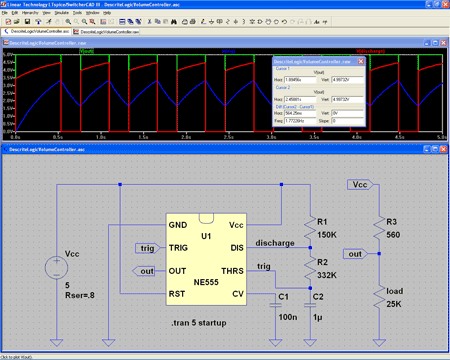
Here is what I was able to generate using the [tag]LTspice[/tag]/[tag]SwitcherCAD III[/tag] tool:
View larger image>
Download 555 Astable Flip-Flop Schematic Circuit Diagram>
Referring to the figure above:
Green Trace -> Output (IC 555 pin 3)
Blue Trace -> Trigger / Threshold (IC 555 pins 2 & 6)
Red Trace -> Discharge (IC 555 pin 7)
The Astable Multivibrator
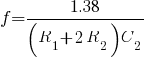
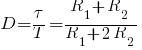
The circuit shown above will trigger itself and free run as a multivibrator. The capacitor C2 charges through resistors R1 and R2 yet discharges through R2 only. Thus, the duty cycle (D) may be precisely set by the ratio of these two resistors. The capacitor charges and discharges between 1/3 Vcc and 2/3 Vcc. But the initial pulse charges C2 starting from 0 Vcc and so this first pulse duty cycle is unique. Since the charge rate and the threshold levels are directly proportional to the supply voltage Vcc, the frequency of oscillation (f) is independent of the supply voltage.
| Frequency Calculation | Duty Cycle Calculation |
|---|---|
 |
 |
 |
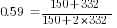 |
| Measured = 1.8 hertz | Measured = 0.60 |
Where: is frequency in hertz is frequency in hertz is capacitance in farads is capacitance in farads is resistance in ohms is resistance in ohms |
Where: is duty cycle is duty cycle is non-zero output duration is non-zero output duration is the period of the output is resistance is the period of the output is resistance |
Reference
- 555 Datasheet icm7555.pdf
- Linear Technology’s SwitcherCAD™ III Landing Page
[tags]simulator, Spice, CAD[/tags]
March 24, 2008
WordPress Math Publisher Plugin Support
Ron Fredericks writes: This is just a short post to point my readers to a new mathematics publishing plugin available from ECI’s Blog Center. This plugin offers a simple alternative to the more standard approaches: XML’s MathML and Math into LaTeX.
WordPress Math Publisher plugin home page
www.embeddedcomponents.com/wordpress/wpmathpub/
Usage
An example of how it can be used is your blog posts:
Results in:

where:
 is defined as a
 is defined as b
References:
Pascal Brachet’s phpmathpublisher
Home: www.xm1math.net/phpmathpublisher/
Usage: www.xm1math.net/phpmathpublisher/doc/help.html
Matteo Bertini’s WordPress plugin called PHP Math Publisher
www.slug.it/naufraghi/programmazione-web/wpmathpublisher
Randy Morrow’s WordPress plugin called Axiom
wordpress.org/extend/plugins/axiom/#post-2794
[tags]Ron Fredericks, Embedded Components, WP Math Pub, wpmathpub, math, mathematics, publish, plugin, phpmathpublisher, axiom, MathML, LaTeX[/tags]
November 21, 2007
How to Leverage the Value of a Board Support Package
Ron Fredericks writes: There are three separate views to what defines an effective Board Support Package (BSP). I believe each of these views is correct as independent descriptions of a BSP. But together these views provide insight into the embedded target from equally important perspectives or engineering disciplines. Read this post to learn more about the essence of embedded systems and how Wind River’s VxWorks BSP architecture has been a critical success factor in comparison to many other real-time embedded operating system executives and kernels available today.
I chose to discuss Wind River’s VxWorks BSP because of my familiarity with their product line, my understanding of their BSP as a competitive product compared to other real-time kernels, and because of my industry accomplishments working with Wind River’s BSPs:
- Ron Fredericks wins Wind River’s prestigious Navigation Award for designing, launching, and marketing the first online interactive social network for BSP’s. more>
- Ron Fredericks wins Aiysis’ Million Dollar Club Award for nurturing a Wind River partnership between VxWorks and Aiysis DriveWay BSP tool kit that generated over one million in annual sales. more>
- Ron Fredericks co-author’s an article with Xilinx on How to Design Field Upgradable Systems based on FPGA Internet connectivity with VxWorks BSP’s. more>
- Ron Fredericks produces an online video: How to Prototype a Device Driver [or BSP] in Less Than – Wow! – 5 Minutes for a Freescale application processor / communications co-processor System on Chip (SoC). more>
A similar high level discussion can not be made for most embedded Windows or embedded Linux BSP’s today. This is because the BSP for these monolithic kernels are not as modular as a real-time executive kernel such as VxWorks. Indeed other real-time kernel vendors can and do take advantage of the BSP too. But, the VxWorks BSP just took more advantage of this natural separation between board support and kernel tasks earlier in the marketplace and has been an advantage for its customers as a result ever since.

Figure 1 – Embedded device with BSP connected to a host workstation
As shown in Figure 1, most BSP’s today, even those for embedded Windows and embedded Linux, do have a robust set of boot options. In many cases a BSP can be used on its own to network attach to a shared file system where the full operating system and application can be loaded. In this way, a device under development need not be the device where development takes place. The BSP in this case forms the basis for a cross-platform development environment – a big plus for developers of embedded systems. Developers often expect cross-platform development to include a BSP with a limited network stack to load new code onto the target hardware during a cold reset. The BSP might use JTAG on-chip run-time control, RS232 serial port, FTP, Bootp, TFTP and RARP, or even a command shell with a full network stack, as the boot loading protocol. But what ever host to target connectivity is used, cross-development allows a high end workstation to be used for time-saving development along with an easy way to download the resulting compiled relocatable object code or a linked and located image onto an embedded target.
For hardware vendors, the BSP is a very useful partner tool. If a hardware vendor makes a set of boards along with a bus pre-assembled as a subsystem or just a single board computer, the BSP allows its clients to leverage this hardware for software development right away. So a hardware vendor can select major operating systems that meet the needs of its target client base and offer a BSP suitable for these operating systems. Usually the BSP is not a licensed product from the operating system vendor and can be bundled royalty free or under very libral license fee conditions. In this way, the operating system vendor or the open-source community, can partner with this hardware platform as a known reference for direct end products or for development of custom products. The horrible alternative is a slow hardware bring-up using new hardware for the first time to build a unique BSP – a very slow and expensive procedure where few software debug tools are available. JTAG or other N-wire run-control devices can be used with an operating system vendor’s debugger in some cases when a robust BSP is not already available. Silicon vendors and I/O device vendors can leverage this technical marketing strategy too.
I encourage Microsoft and embedded Linux communities to consider improving their BSP strategy to deliver more value from a separate BSP structure too. I also encourage my readers to go ahead and submit comments to this blog post if you know of other vendors with good BSP designs as the marketplace is always changing.